How can construction companies fix user experience (UX) mistakes on their websites to win more qualified bids and client inquiries?
The answer lies in improving page speed, simplifying navigation, optimizing for mobile screens, and presenting real project proof with clear calls to action. Fixing these digital friction points helps improve market visibility and turns your website into a reliable business asset.
Why User Experience Matters on Construction Company Websites
In a competitive market, a website serves as your firm’s digital job site trailer and primary portfolio. When commercial developers, architects, or property managers land on your page, their first impression often shapes how they view your field management and craftsmanship.
Construction projects rely heavily on reputation and trust. Industry data shows that over 70% of commercial buyers research firms online before making initial contact, and nearly 60% report higher trust when they see a well-organized project portfolio. For residential builders, up to 90% of clients research online before booking a consultation.
How Poor UX Hurts Leads and Reputation
A website that is hard to use can quickly weaken lead generation and brand trust. If a homepage takes too long to respond, conversion rates can drop steadily with each second of delay. In active markets like New York, decision-makers review multiple general contractors and specialty firms side by side. If your site is slow, outdated, or difficult to read, prospective clients often move on to a competitor with a cleaner online presence.
Many buyers equate website quality with overall service standards. A broken or confusing layout can create doubt about your attention to detail on the job site. Because modern B2B buyers consult multiple resources and review several firms before issuing a Request for Proposal (RFP), your digital presence must project organization and clarity.
Common Goals for Construction Website Visitors
To improve user experience, you must understand what your visitors need to find:
Commercial clients, general contractors, and developers visit to confirm capability. They look for relevant project scope, technical qualifications, safety records, and proof of timely delivery through detailed case studies.
Property owners and private clients focus on visual project galleries, local service areas, customer testimonials, and clear contact steps. In both cases, visitors want to confirm your construction expertise quickly without hunting through disorganized pages.
Most Frequent UX Mistakes on Construction Company Websites
1. Slow Website Load Times
Slow page speeds frustrate visitors and cost firms valuable inquiries. During the vendor research phase, decision-makers expect pages to load in under three seconds. When a page lags, bounce rates rise, and potential clients leave before seeing your work.
Why Fast Load Speeds Are Essential
Page speed directly impacts both user retention and search engine rankings. Search engines use mobile-first indexing to evaluate site speed, meaning a slow mobile experience can lower your market visibility. Industry studies indicate that a large percentage of B2B websites take longer than three seconds to display core content, giving faster websites a distinct competitive edge.
Common Causes of Slow Performance
Construction websites often run slowly due to a few common technical bottlenecks:
- Uncompressed project imagery: Uploading full-resolution photography files directly from cameras or phones.
- Low-tier hosting: Shared hosting plans that lack the resources for modern web applications.
- Plugin bloat: Outdated or excessive plugins running background scripts.
- Missing browser caching: Forcing returning visitors to reload every visual asset from scratch.
- Lack of a Content Delivery Network (CDN): Delivering heavy media files without distributed server support.
- Heavy design elements: Complex video backgrounds or sliders that slow down browser rendering.
How to Boost Page Speed
Improving site speed involves standard technical maintenance:
- Compress images: Convert project photos to modern web formats (such as WebP) and compress file sizes before publishing.
- Upgrade web hosting: Move to managed, high-performance hosting environments.
- Clean up code: Remove unused plugins and minify CSS, JavaScript, and HTML.
- Enable caching and CDN: Use browser caching rules and a reliable CDN to speed up asset delivery.
- Monitor performance: Check Core Web Vitals regularly to keep Largest Contentful Paint (LCP) under 2.5 seconds.
2. Unclear or Weak Calls to Action
A website can display remarkable projects, but it will not generate inquiries if it does not guide prospects toward a logical next step. A clear Call to Action (CTA) directs visitors on how to request an estimate, submit bid documents, or schedule an initial consultation.
Why Calls to Action Drive Conversions
Strategic CTAs move visitors from passive viewing to active business discussions. Well-placed, direct buttons give prospects a frictionless path to connect with your estimating or business development team.
Examples of Ineffective CTAs
Common CTA mistakes on contractor websites include:
- Vague wording: Using passive labels like “Click Here” or “Read More” instead of action-oriented phrases.
- Poor placement: Hiding contact buttons at the bottom of lengthy pages or deep inside submenus.
- No clear value: Failing to explain what happens after clicking the button.
- Competing buttons: Offering too many choices on a single screen, which causes hesitation.
Creating Strong, Visible CTAs
To improve conversions, make your primary actions clear and accessible:
- Use direct, action-driven copy: Phrasing like “Request a Project Estimate,” “Submit Bid Documents,” or “Schedule a Consultation” sets clear expectations.
- Place CTAs prominently: Keep a primary action button in the sticky header and at the conclusion of key service and project pages.
- Maintain focus: Keep one primary call to action per page to guide the user cleanly through the conversion path.
- Ensure high contrast: Design buttons with contrasting brand colors so they stand out on both desktop and mobile devices.
3. Poor Mobile User Experience
Construction executives, project managers, and property owners frequently review websites on mobile devices while traveling between job sites and meetings. A site that fails on a phone can cost your business a substantial volume of potential work.
How Mobile Issues Affect Construction Clients
When a mobile site is difficult to navigate, visitors leave quickly. In addition, search engines evaluate the mobile version of your site to determine search positions. A poor mobile layout can reduce search rankings and lower inbound traffic.
Typical Mobile UX Problems
- Small text that forces users to zoom in manually.
- Tightly grouped buttons that are difficult to tap accurately.
- Contact forms that overflow the screen or do not support mobile auto-fill.
- Complex navigation menus that fail to open or close properly.
- Large image files that break screen layouts and slow down loading over cellular networks.
Optimizing for Mobile Responsiveness
A mobile-optimized build ensures smooth performance across all devices:
- Implement modern, responsive website design and development for construction companies that adapts layouts cleanly to any screen size.
- Use legible typography scales and provide ample touch padding for all clickable elements.
- Simplify navigation with clear mobile menus and sticky header contact buttons.
- Test contact forms and upload fields on physical iOS and Android devices regularly.

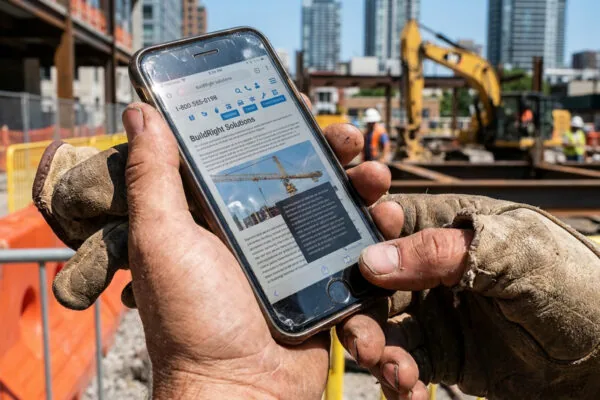
A site manager uses a smartphone-based project dashboard to monitor progress and access construction plans directly on site.
4. Disorganized Navigation and Structure
Just as a successful construction build requires clear architectural plans, a website requires intuitive information architecture. Disorganized navigation makes it difficult for potential clients to find proof of your capabilities.
Why Site Structure Matters to Users
A clean menu structure allows owners and developers to quickly locate your scope of work, project portfolio, and safety qualifications. It also helps search engine crawlers understand how your pages relate to each other, improving visibility across your service areas.
Frequent Navigation Mistakes
- Overcrowded menus with confusing drop-down structures.
- Vague labels that make services difficult to identify.
- Single-page websites that fail to provide detailed information on specific service offerings.
- Missing category filters within project galleries.
Designing Clear, Intuitive Navigation
Keep your navigation straightforward and easy to follow:
- Limit the main header menu to essential sections: Services, Projects, About, Safety/Qualifications, and Contact.
- Organize your portfolio with intuitive filters by sector, project type, or location.
- Create dedicated pages for each core service to provide sufficient technical depth and support search visibility.
5. Insufficient Trust Signals or Social Proof
Trust is the foundation of the construction industry. Without clear proof of reliability and past performance, prospects are less likely to initiate contact. Incorporating visual proof, reviews, and industry credentials builds immediate credibility.
How Trust and Social Proof Affect Inquiries
Adding verified trust elements helps reassure prospective clients during their vetting process. Displaying completed projects, client references, and third-party certifications helps establish your firm as a trusted partner.
Missing Elements That Build Trust
- Detailed client testimonials and project reviews.
- Documented project case studies with before-and-after imagery.
- Trade licenses, insurance credentials, and safety certifications.
- Authentic on-site photography captured through video & photography for construction rather than generic stock imagery.
- Industry association badges, awards, and trade group memberships.
- Valid SSL security certificates.
Where to Place Certifications, Reviews, and Project Highlights
Place trust-building assets where visitors make key decisions:
- Include concise client quotes on the homepage and alongside relevant service descriptions.
- Create dedicated case studies that outline project challenges, solutions, and delivered results.
- Display safety records, trade associations, and licensing information in an accessible accreditations section or footer.
- Keep review feeds and project portfolios updated with recent work to show ongoing market activity.

A credibility-focused presentation combines customer reviews, industry certifications, and project results to reinforce trust in a construction company.
6. Outdated or Inconsistent Branding
Your online branding represents your company’s standard of work. Inconsistent logos, conflicting color palettes, and dated layouts can signal a lack of attention to detail, which harms your standing in a competitive market.
Impact of Visual Consistency on Credibility
Consistent typography, color palettes, and project presentation show that your firm is organized and established. Professional branding & visual identity for construction companies helps reinforce your market presence across websites, proposals, vehicles, and job sites.
Identifying Branding Mistakes
- Using low-resolution or mismatched logo files across different pages.
- Inconsistent font families, colors, and layout styles.
- Outdated taglines or service descriptions that no longer match your core business.
- Low contrast between text and background images, making copy hard to read.
Refreshing Design to Reflect Professionalism
To establish a cohesive visual presence:
- Establish clear brand guidelines for typography, color systems, and logo usage.
- Ensure your value proposition accurately reflects your current capabilities and target clients.
- Apply consistent layout structures across every service and portfolio page.
- Use authentic, high-quality photography that showcases your real projects and team in the field.
7. Weak SEO and Poorly Targeted Content
A website cannot generate leads if prospective clients cannot find it through search engines. Thin page copy, missing metadata, and a lack of localized keywords reduce your visibility when developers and property owners search for regional contractors.
Common SEO Problems in Construction Sites
- Missing or duplicate meta titles and descriptions.
- Improper heading structures that make pages difficult for search algorithms to parse.
- Thin service descriptions that lack technical details and local geographical keywords.
- Images uploaded without descriptive alt text.
- Absence of structured data (schema markup) for local businesses, services, and reviews.
How Bad Content Structure Hurts Rankings
When pages lack detailed copy and clear structure, search engines struggle to index them for relevant search queries. Single-page sites or thin pages under 200 words fail to demonstrate topical authority, lowering your opportunities to compete for valuable commercial terms.
Improving On-Page SEO and Local Visibility
Strengthen your search presence with structured content practices:
- Draft dedicated service pages with comprehensive details on your process, capabilities, and materials.
- Use proper heading tags (H1, H2, H3) to organize information logically.
- Incorporate local market terms naturally throughout your page copy.
- Add structured schema markup to clarify your business type, services, and completed project locations.
- Maintain an active company blog or insights section to share industry updates, technical insights, and project milestones.
8. Broken Forms, Links, or Contact Methods
Technical errors on contact forms or RFQ pages create immediate friction. When an estimator or developer cannot submit plans or receive an error message, they will rarely make a second attempt.
How Technical Issues Frustrate Prospects
Broken submission forms and dead links signal poor digital maintenance. If an estimating team cannot upload plan sets or project specifications, your firm can miss out on bidding opportunities before conversations even begin.
Checklist for Fixing Forms and Links
- Test all contact and RFQ forms monthly and after any software updates.
- Provide file upload capability for architectural drawings, PDFs, and CAD files.
- Create distinct inquiry paths: one for bid document submission and one for general inquiries.
- Keep initial contact forms concise (5 to 7 fields) to encourage completion.
- Set up automated confirmation emails and route submissions directly to the correct estimating or management teams.
How to Audit and Fix UX Issues on Your Construction Company Website
Diagnosing user experience issues requires a systematic approach similar to a site inspection. By auditing performance, structure, and user behavior, you can prioritize fixes that have the greatest impact on business growth.
What Tools Help Identify UX Problems?
Several standard tools provide objective diagnostic data:
- Performance and Mobile Testing: Google PageSpeed Insights and Core Web Vitals reports.
- Traffic Analysis: Google Analytics 4 (GA4) and Google Search Console to monitor page drop-offs and user paths.
- Behavior Tracking: Heatmap and session recording tools to see where visitors encounter difficulty.
- Technical Audits: Site crawlers to find broken links, missing meta tags, and redirect loops.
Essential Steps to Diagnose Common Issues
Implement a recurring review routine:
- Review monthly analytics to identify high bounce rates on key service pages.
- Test user pathways and form submissions across mobile phones, tablets, and desktop browsers.
- Audit project galleries to confirm that all images load quickly and include accurate project details.
- Ensure all contact forms, telephone links, and email addresses function properly.
Best Practices for Prioritizing Fixes
Focus resources on areas that directly affect lead generation:
- Address technical errors, slow page loading, and broken forms first.
- Improve mobile responsiveness and button placement on high-traffic landing pages.
- Clarify navigation labels and organize project case studies.
- Refresh visual branding and photography across the entire site for visual consistency.
Checklist: Preventing UX Mistakes in Future Website Projects
Use this reference checklist when planning website updates or redesigns:
- Design for prequalification: Highlight licenses, safety records, and technical capabilities alongside project galleries.
- Provide procurement-friendly forms: Enable secure document uploads for plans, specifications, and RFPs.
- Establish strict speed budgets: Compress all visual assets and keep Core Web Vitals within recommended targets.
- Ensure full mobile functionality: Build responsive layouts with legible type and comfortable button spacing.
- Simplify site structure: Limit main menu items and offer clean category filters in your project portfolio.
- Keep trust proof current: Regularly publish updated project case studies, client reviews, and safety milestones.
- Maintain consistent visual identity: Align colors, typography, and messaging across all web pages.
- Apply solid SEO fundamentals: Use structured headings, local keywords, image alt text, and comprehensive service copy.
- Conduct regular technical maintenance: Test forms, links, and page performance on a monthly schedule.
FAQ: Improving UX on Construction Company Websites
How Often Should You Audit Your Construction Website?
Conduct a full user experience and technical audit at least once or twice per year. Additionally, review analytics monthly to track user paths and verify that all contact forms and document upload features operate smoothly.
What Metrics Track UX Success?
Key indicators include engagement rates, average time on page, bounce rates, and form conversion rates. Monitoring Core Web Vitals and organic search positions also provides clear insight into site health and visibility.
Should You Hire a UX Professional or Agency?
While minor text updates can be handled internally, comprehensive redesigns, technical performance optimization, and custom portfolio architecture often require specialized expertise. Partnering with an agency like BuiltFor Studio provides construction firms with industry-focused strategy, branding, and web development tailored to how developers and commercial clients evaluate contractors.